


Reschedule production when the ERP doesn’t do it
Field report
How we built a production scheduler in no-code with Vision, with just enough JavaScript where it actually matters.
Industrial no-code
1 · Initial schedule

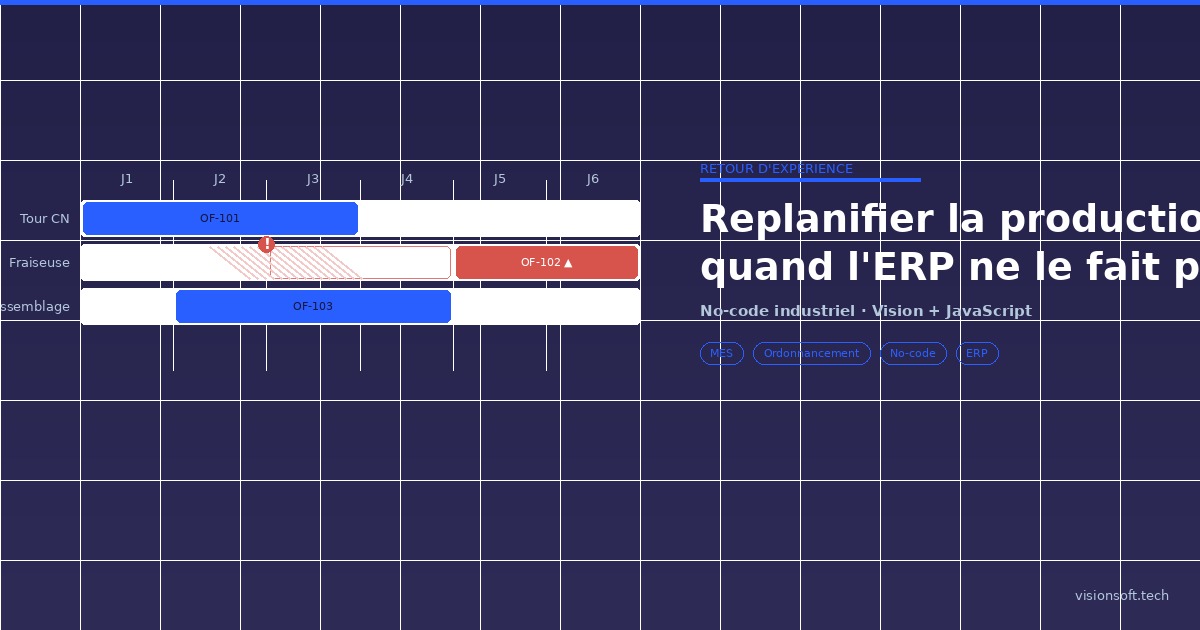
The Milling machine breaks down; PO-102 slides to D5-D6 on the same workstation, flagged as delayed. The supervisor validates the proposal.
1.The problem
The ERP does its job well: it converts orders into production orders through requirements calculation. But this calculation runs at infinite capacity, on a fixed horizon. It assumes machines are always running and materials are available. The schedule is accurate on Monday morning; after the first disruption, it becomes fiction. And disruptions happen every day: a component shortage, a supplier delay, a machine breakdown, an absence, a customer emergency, a rejected batch. Each time, the supervisor reopens Excel, makes phone calls, moves labels on a wall planner – with no visibility on the cascading effects.
2.Screens and workflows, in no-code
With Vision, we do not design mockups: we describe the need, the platform generates the application, and we refine it in no-code. We always start with the data model – it structures everything else.
| Entity | Main fields |
|---|---|
Production Order | item, quantity, due_date, priority, status, workstation, planned start / end |
Item / Bill of Materials | reference, type ; + component (linked to Item), quantity_per |
Stock | item, available_quantity, reserved_quantity |
Workstation | name, daily_capacity (h), calendar, status |
Disruption | type, related PO / workstation / item, impact, date |
On the screen side, we generated the essentials: the Gantt by workstation (above), the filterable PO list, the PO detail view, the load table, the disruption declaration form, and the delays dashboard. The lifecycle of a PO is described as a sequence of states:
The transition to “Ready to launch” is not manual: a rule checks that all components are in stock. And declaring a disruption triggers rescheduling, which the supervisor then validates. All of this is described in Vision in just a few lines:
3.The brain: a little JavaScript
No-code handles the screens, the data, and the workflows. But scheduling at finite capacity with material constraints is a real optimisation problem – it cannot be configured through a menu. We wrote it in JavaScript, in a block called by the “Declare a disruption” workflow. No overengineering: a list heuristic in 4 steps, simple enough to explain to the supervisor.
The core of the matter for the supervisor: when a disruption occurs, we apply its effect, re-run the engine, and present the quantified gap between the old and new schedule. The decision remains human.
const rescheduleOnDisruption = (disruption, state) => {
  const before = state.schedule;
  switch (disruption.type) {                      // 1) apply the disruption
    case "breakdown": state.closeStation(disruption.station, disruption.duration); break;
    case "delay":     state.pushReceipt(disruption.item, disruption.days);        break;
    case "reject":    state.reInjectPO(disruption.po, disruption.quantity);       break;
    case "emergency": state.forcePriority(disruption.po, "urgent");             break;
  }
  const after  = schedule(state, disruption.date);  // 2) re-run the engine
  const impact = after.pos                           // 3) quantify the gap
    .map(o => ({ po: o.ref, previousEnd: before[o.ref]?.end,
                newEnd: o.end, delayed: o.end > o.dueDate }))
    .filter(d => d.previousEnd !== d.newEnd);
  return { schedule: after, impact, pendingValidation: true };
};
The supervisor then sees a clear proposal – “3 POs shifted, 1 new delay on order X” – which they can validate, adjust, or reject.
4.Key takeaways
- The right split: no-code for the application (90% of time saved), JavaScript for the business logic (the scheduling algorithm).
- A simple, explainable heuristic beats a perfect optimisation that nobody understands: the supervisor must be able to follow the decision.
- The ERP remains the source of requirements and master data; we add on top of it the reactive rescheduling layer it lacks.
- From scoping to a usable V1: a matter of days, not an 18-month project – and business teams can evolve the app themselves afterwards.
A scheduling, planning, or shop floor tracking challenge on your side? Let’s talk, and we can share the full algorithm code on request – visionsoft.tech.

Badr Chentouf
CEO de Visionsoft, Badr Chentouf pilote le développement de la plateforme no-code industrielle VISION et de Vaia, son moteur IA génératif. Entrepreneur passionné par l'innovation, il est engagé dans l'Alliance du LCNC Souverain et intervient régulièrement sur les sujets de transformation digitale, vibe coding et gouvernance applicative en industrie 4.0.